
When adding a serial header to the board of a WDR3600 and using the same RS232 TTL converter as with the WDR4300 I found the output was all garbage. I re-soldered the connectors several times but the output remained unchanged.
After some investigation I found that a TTL UART converter is required so I ordered one from ebay titled
USB 2.0 to TTL UART 6PIN CP2102 Module Serial Connector Converter Adaptor Cable

which arrived today, inserting into my Windows 7 laptop the appropriate device driver could not be found for it, after some further investigation I found the correct one for it which i've made available from here
Other windows versions and os's are also available to download from
The converter which worked with the WDR4300 but not the WDR3600 is titled
MAX232 RS232 Serial To TTL Output Converter Board RXD TXD RTS CTS F PIC Atmel
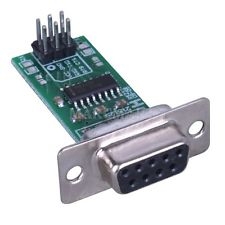
and the output from it was
[code]n³ÔIXðzåyÿþñ0~`ÿ!¡ =äþ@}ü?Kxððý°
0vÂüüþòýÈPøðÀ íxøTÄ
0@Løð>ý°08 èTöuÀà@Ààäì°o °ý$ôÀèÐÏ
ÀÄ ÉðþõäÄ°àø8ô9ø:pHHTÀ?hÐãÀ8dú8:(þ 9ãÀxd8`ÜÐÃøÀðøÀÀÐ@(ÊïzÀn¨Â#îÉÂà~r `À)1ð@ÌäÀ0'ð<8Àa0à`9þø
8P~`dç80þA Àûøüð ¼ãàd8x980@óø
À[/code]
Using the TTL UART converter output was as expected
[code]U-Boot 1.1.4 (Sep 9 2013 – 14:28:41)
U-boot DB120
DRAM: 128 MB
id read 0x100000ff
flash size 8MB, sector count = 128
Flash: 8 MB
Using default environment
PCIe Reset OK!!!!!!
In: serial
Out: serial
Err: serial
Net: ag934x_enet_initialize…
No valid address in Flash. Using fixed address
wasp reset mask:c03300
WASP —-> S17 PHY *
: cfg1 0x7 cfg2 0x7114
eth0: ba:be:fa:ce:08:41
athrs17_reg_init: complete
eth0 up
eth0
Autobooting in 1 seconds
## Booting image at 9f020000 …
Uncompressing Kernel Image … OK
Starting kernel …
Booting Atheros AR934x
[ 0.000000] Linux version 2.6.31–LSDK-9.2.0_U6.616 (tplink@localhost.localdomain) (gcc version 4.3.3 (GCC) ) #1 Mon Sep 9 14:32:03 CST 2013
[ 0.000000] Ram size passed from bootloader =128M
[ 0.000000] flash_size passed from bootloader = 8
[ 0.000000] CPU revision is: 0001974c (MIPS 74Kc)
[ 0.000000] ath_sys_frequency: cpu srif ddr srif cpu 560 ddr 450 ahb 225
[ 0.000000] Determined physical RAM map:
[ 0.000000] memory: 08000000 @ 00000000 (usable)
[ 0.000000] Zone PFN ranges:
[ 0.000000] Normal 0x00000000 -> 0x00008000
[ 0.000000] Movable zone start PFN for each node
[ 0.000000] early_node_map[1] active PFN ranges
[ 0.000000] 0: 0x00000000 -> 0x00008000
[ 0.000000] Built 1 zonelists in Zone order, mobility grouping on. Total pages: 32512
[ 0.000000] Kernel command line: console=ttyS0,115200 root=31:02 rootfstype=squashfs init=/sbin/init mtdparts=ath-nor0:128k(u-boot),1024k(kernel),6912k(rootfs),64k(config),64k(ART) mem=128M[/code]